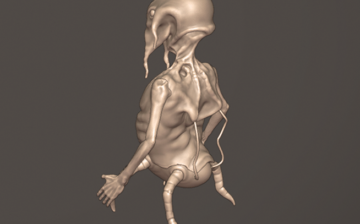
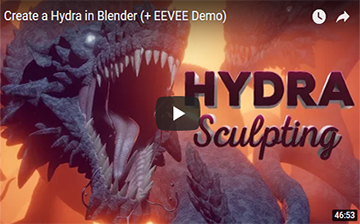
In deze relatief korte video staan enkele tips voor het verbeteren van je vaardigheden op het gebied van sculpten. De software die in de video wordt gebruikt voor het sculpten is Blender, maar de tips zijn algemene principes.
Samengevat:
Gebruik een tablet bij het sculpten
Bedenkt vooraf wat je wil gaan sculpten en blijf oefenen
Bestudeer de anatomie van een mens of dier
Maak gebruik van de gereedschappen in je software en zorg dat je ze snel kunt vinden en gebruiken.
Voor de Blender (en Star Wars) liefhebbers, hier een leuke inspiratievideo !
Met de tools die je in de Polygonal Modeling modules C3M14 en C3M23 heb geleerd, en wat extra onderzoek / eigen initiatief, zou jij dit ook kunnen maken. Waarschijnlijk niet in één minuut maar …. ? Ben benieuwd !
You have probably heard of the phrase “To think outside of the box”?
This is a film about such a box and the flat-headed creatures that live inside of it. Life inside the Box is boring and miserable. Until one day a new baby boy starts to grown in the middle of the Box! The boy is very different from other flat-headed inhabitants of the Box- he’s happy, lively and curious. As the boy grows bigger and bigger, the flat-headed neighbours are becoming more and more annoyed with him. Until one day he grows literally over their heads…
Christopher Barnatt from Explaining Computers provides an overview of the 3D Printing highlights and innovations from the Time Compression Technology exhibition.
The 2019 TCT Show was held from 24-26 September at the NEC in Birmingham, UK.
Christopher’s highlights include particular coverage of products and innovations from Stratasys, Ultimaker, Formlabs, HP, Photocentric, EnvisionTEC, MakerBot, Prusa, Ansioprint, 3D Systems, SLM Solutions, Digital Metal and Zortrax.
Jiri Praus is een elektronische-schakelingenkunstenaar en bouwde zelf met behulp van een 3D Printer een machine die zijn werk vergemakkelijkt wanneer hij repetitieve taken uit moet voeren of wanneer er identieke onderdelen nodig zijn. Goed idee toch !?
On August 16th, 2019, Prusa Research set a new world record for the Most 3D printers operating simultaneously with 1096 3D printers operating at the same time in one room. The record was officially confirmed by a representative of Guinness World Records. In this article you can read how it all happened!
The Blender Tutorial Bible is the world’s most comprehensive collection of curated Blender tutorials and courses from all over the digital art community.
If you want to learn Blender (better), this will help you definitely.
In this tutorial, learn how easy it is to 3D print your own dungeon tiles for your DnD and tabletop gaming! With even a simple 3D printer, you can download free files, print your own dungeon tiles, and easily paint them using these simple techniques.
A short documentary, mapping everything from Josef’s first Mendel to the current stage of the Prusa Research company.
You’ll see a ton of things they have never shown before – from powering the entire building with a diesel generator when our farm blew the building’s fuses, to the complex testing machines they have come up with for QC.
Have fun watching it. And leave a comment if you want.
Chou-Tac is a designer blogger who helps aspiring designer and professionals to level up their skills and live their passion for design at http://www.thedesignsketchbook.com blog.
His 3 golden rules that propulse you in the top 3% of the population are: ⭐️ Golden rule 1: See the world in transparency | Draw anything using geometry ⭐️ Golden rule 2: Simplify | Break down objects in few simple forms ⭐️ Golden rule 3: Order matter | Learn how you should start a drawing
He hosts a design sketching course for whom want to make professional sketches that stand out from the crowd. But also sketching faster and get even more creative.
His course fits a certain philosophy that what matter more than sketching skills, is building self-confidence.
So, For Those About to Rock (This may be your course). ! Good luck
SMARS acronym of “Screwless/Screwed Modular Assemblable Robotic System” is a simple robot designed to the educational field.
The main features of SMARS are the reduced number of components, the possibility of mount it without screws and without soldering any part, it doesn’t need glue or similar and it’s really cheap to build.
Another main point of SMARS is the modular design. You can mount different sensors and tools and design your own parts.
If you are interested in building one within your 3D Ambacht traject, let Eric know, he’ll provide you the materials 😉
Die tekst kom je vaker tegen als je bij 3D Ambacht een opleiding volgt.
Vandaag kwam ik deze afbeelding en bijbehorende video tegen waarbij ik vermoed dat de maker zeker dat advies heeft gevolgd, al was hij geen deelnemer van 3D Ambacht 😉
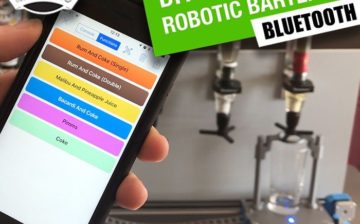
Arduino Robotic Bartender – 3D Printable & Bluetooth
Build yourself a low-cost easy to assemble bluetooth controllable robotic bartender using an Arduino Uno. This easy Arduino based project can be 3D printed and is a cool Arduino project for beginners.
Mocht jij deze ‘Intstructable’ willen volgen, dan stelt 3D Ambacht de materialen ter beschikking, met dien verstande dat de ‘build’ dan wel in de Studio gebruikt gaat worden 😉
Found yourself staring at a blank screen with no idea where to begin your next Blender project, fearing you will “lose it” if you keep on going without finally starting a new project?
Congratulations: you’ve just hit a creative block.
Take a deep breath and let’s refresh your productivity with a few trusted tricks of the trade.
First of All: Realize It’s Normal
Creative blocks happen to every artist who works long enough. As you grow and learn your own artistic habits, you’ll form your own ways of breaking through these creative droughts, though it helps to remember that creative blocks have hit virtually all artists at some point, from F. Scott Fitzgerald to Jackson Pollock.
Anything is Better Than Nothing
So what can you do to become productive again? In the words of Shia LaBeouf, “JUST DO IT!” As a visual artist, you have asserted yourself as a creative person. Trust that instinct and give yourself the freedom to create something even if you’re not sure what it is or what you’ll ever use it for. When you’re dealing with creative blocks, the only goal is to simply create. There’s an old saying to make your mantra when you’re feeling stuck on a project “Perfection is the enemy of the good.” Speaking of mantras…
Don’t be Afraid to Meditate
Meditation can seem like a very abstract or mystic concept, but it is simply the practice of being aware of each passing moment. Better still, studies have found that certain meditation techniques can promote creative thinking, even if you have never meditated before.
The New York Times has put out a free and helpful guide to meditation without the new-age or spiritual takes that can dissuade many from taking part.
Re-educate Yourself
Sometimes all you need is to go back to the basics. Grab some Blender tutorials and start from the beginning to refresh the fundamentals. Focusing on the basics of the craft can get you creating without stressing about giving your creation all the bells and whistles available. When you’re stuck, simple is better.
Say Yes to Any Old Idea
Most artists have a lot of projects sitting in the cluttered drawers of their minds. For whatever reason, these ideas never came to life. Why not give them another go? Your creative block is their second chance to become something amazing. A lot of times, you’ll find the reasons that caused you to ditch the project in the first place have gone away. If not, break them down and make it your goal to solve each one as you create.
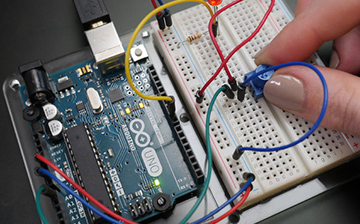
The Arduino microcontroller has a nearly limitless array of innovative applications for everything from robotics and lighting, to games and gardening! It’s a fun way to automate everything, enabling you to control simple devices or manage complex Halloween displays.
HERO is a showcase for the upcoming Grease Pencil in Blender 2.8. Grease Pencil means 2D animation tools within a full 3D pipeline. In Blender. In Open Source. Free for everyone!
Entirely made in Blender
Kijk zeker vanaf 2:30 min !
De eerstvolgende nieuwe release van Blender 2.8 wordt dit daar verwacht. Wil je de nieuwe ontwikkelingen volgen kijk dan op https://code.blender.org/ voor meer nieuws. De meest spectaculaire nieuwe toevoegingen in Blender 2.8 zijn hier te zien.
Deze video van Zacharias Reinhardt, leert je in het eerste half uur niet alleen beter te sculpten in Blender (Dynamic Topology) maar heeft daarnaast ook een aantal prima modelleer tips. De video duurt ong. 45 minuten (het eerste half uur is denk ik het meest interessant) en heeft dus een aantal interessante passages:
Chapters
02:26 – Start of the timelapse
03:22 – Use curves for sculpting
06:40 – Pull out geometry (Sculpt Mode)
08:37 – Rotate objects using the 3D cursor
10:54 – Copy transformations to another object
12:39 – Temporarily save different transformations
16:48 – Isolate objects
18:37 – Work with linked object data
22:35 – Displace Modifier for adding more details
28:18 – Use the Jitter option (Sculpt Mode)
31:36 – Analyzing the scene setup
34:16 – Analyzing the procedural shaders
41:11 – Analyzing the post processing (Photoshop)
42:59 – Hydra in Blender 2.8 EEVEE demo
Zacharias or Zach, is a passionate 3d and 2d artist who love’s to work with Blender and makes a living from what he love’s doing.
Do you struggle to find inspiration and ideas for your art? This is probably something every artist is experiencing from time to time, including me. To get over this, I developed a simple but effective strategy for always having good ideas on hand, from which I can choose from.
In a nutshell: Never stop looking for inspiration!
Step #1: Define the direction
When it comes to art, there are basically two general directions which you can go, your personal art or a specific project. Think about on what project you want to work next and decide to which of the two directions this project should be assigned to.
Step #2: Define the general topics
Think about what the general topics of the art piece you want to create next actually are. But keep it general, this is not the point where we are looking for the actual inspirations or ideas. Writing it down can help a lot.
Step #3: Find inspiration by exploring what we’re looking at
Now, shortly think about the general topics you had defined earlier, to have them fresh in your mind. Then take a look around you and start analyzing the first thing you are looking at. Make this a habit, no matter where you are and what you are doing. You will see, finding ideas should not be a problem anymore.
Step #4: Write down your ideas (and take photos)
Aas soon as a good idea arrives, write it down. In this way you will have a list, which you always can pick from, if you need a great idea.
That’s about it. You’ll find the complete article here.
by Zacharias Reinhardt | Mar 20, 2018
If you want to see which ideas Zacharias Reinhardt turned into artworks, check his Instagram and Artstation pages.
Participate in a competition every two weeks and become a better digital Artist!
Weekly CG Challange provides a new topic every two weeks (posted Mondays) and you can either do a digital 3D or 2D work. The one important thing you have to consider is that your work must be created with a computer (CG = Computer Graphics). No traditional art is allowed. A jury will select the three best entries for every challenge. The artworks will be presented on the website and Facebook group. Apart from everlasting fame and glory, there are great prizes to be won!
4 Tips for those struggling to find time to learn blender or a ‘3D Ambacht’ like modeling, printing or scanning etc. …
Summary
1. Set a Pre-Determined Project Deadline:
Because art has no finish line, it’s easy to become such a perfectionist that you drag a project on for months. As a result, you become reluctant to start anything new, due to the committment it takes. So agree to a set deadline (I recommend one week), then stick to it.
2. Look for small time windows
We often think that we need a large block of time to do anything meaningful (like a weekend of no interruptions), but they rarely ever pan out. Be like JK Rowling, who wrote the first Harry Potter book while raising a child at home, writing at any spare moment. Put in small amounts of time everyday and you’ll make a lot more progress than someone waiting for large block of time.
3. Agree to do one small thing
I’ve adapted this trick from Rick Ruben who asked rappers with writers block to write just one word of their song they’d been struggling to write. The next day they’d have the entire song completed. Because the hardest part is actually starting. Once you start, it’s easy. So if you can agree to do something extremely small (like click just one thing) you’ll have a much higher chance of forming a habit.
4. Recognize the net gain in Happiness
Sometimes we think of our learning at the same happiness level as entertainment, like “I could learn blender, or I could play Overwatch… so I’ll just do the latter”. But research shows that we actually get 2.5x the happiness from hobbies as we do from TV, yet the average person spends 4x as much time on TV than their hobbies. So when you’re weighing them up in your mind, remember that in the long term a hobby will make you happier.
Dit weekend kwam ik een video tegen van de ‘Blender guru’ Andrew Price. Deze sympatieke Australische jongen heeft zich in de afgelopen 12 jaar verdiept in Blender en ‘runt’ inmiddels één van de meest bekende websites met tutorials, podcasts en producten gerelateerd aan het leren van Blender (een veelzijdig 3D modelleer softwarepakket)
In deze video verteld hij hoe hij er zichzelf het afgelopen jaar toe heeft gezet om in 2D te leren tekenen, iets wat hij tot dan toe niet goed kon. Daarna verteld hij over de 7 ‘gewoonten’ die een succesvolle ‘artiest’ zich eigen zou moeten maken. Zie het als tips voor je tijd bij 3D Ambacht.
Ik zou zeggen, doe er je voordeel mee. Een half uurtje ontspannend kijken is mijn advies 😉
ps: Na het bekijken van dit bericht wil ik je vragen je mening / reactie achter te laten. Wat vond je er van ? Heb je zelf een 8e ‘Habit’ (advies uit ervaring) die je graag wilt delen met je mede studenten ?
Deze week kwam ik via de site Instructables een Youtube video tegen waar iemand ‘leuke’ dingen doet met fidget spinners. Het is een vijf minuten durende video (wat lang dus) maar het meest indrukwekkende vind ik zelf de beelden vanaf minuut 2:35.
Fun with fidget spinners:
Ontwerpen ‘pur sang’
Interessanter vind ik zelf echter de oorspronkelijke video die mijn aandacht trok. Daarin is te zien hoe iemand van een fidget spinnen een brushless motor maakt. Vooral het proces is ‘inspirerend’ om te zien.
Make a Brushless Motor from a Fidget Spinner:
Uitdaging
Voor mij zou het een uitdaging zijn een opstelling te ontwerpen en te 3D printen waarin de diverse (elektronica) onderdelen op een ‘nette’ manier zijn weggewerkt waardoor de spinner bijvoorbeeld met het omzetten van een schakelaar rond gaat draaien.